
Quick answer
- 1
Find out which connection stopped: AI connector, seller account or Amazon Ads.
- 2
Connector: in ChatGPT or Claude open the Vendooly connector settings, disconnect and connect again.
- 3
Seller account or Ads: in the Vendooly app open Marketplaces and redo the Amazon authorization.
- 4
Open a new chat and ask your AI to ping Vendooly.
Which connection do you need to redo?
These are three independent connections: redo only the one that stopped.
- Connector in your AI (ChatGPT or Claude): the AI says Vendooly is unavailable, asks you to connect, or the Vendooly tools disappear. The connection lasts 60 days from when you create it; after that ChatGPT or Claude ask you to redo it.
- Amazon seller account (Seller Central): orders, stock and catalog data stop updating, or the AI reports an invalid Amazon authorization. This happens if the authorization was revoked in Seller Central (Manage Your Apps) or logins and permissions changed.
- Amazon Ads: Marketplaces shows "Ads consent expired" or you received the expiry email. Since 30 July 2026 Amazon expires Ads consent 365 days after you grant it.
Reconnect the connector in ChatGPT
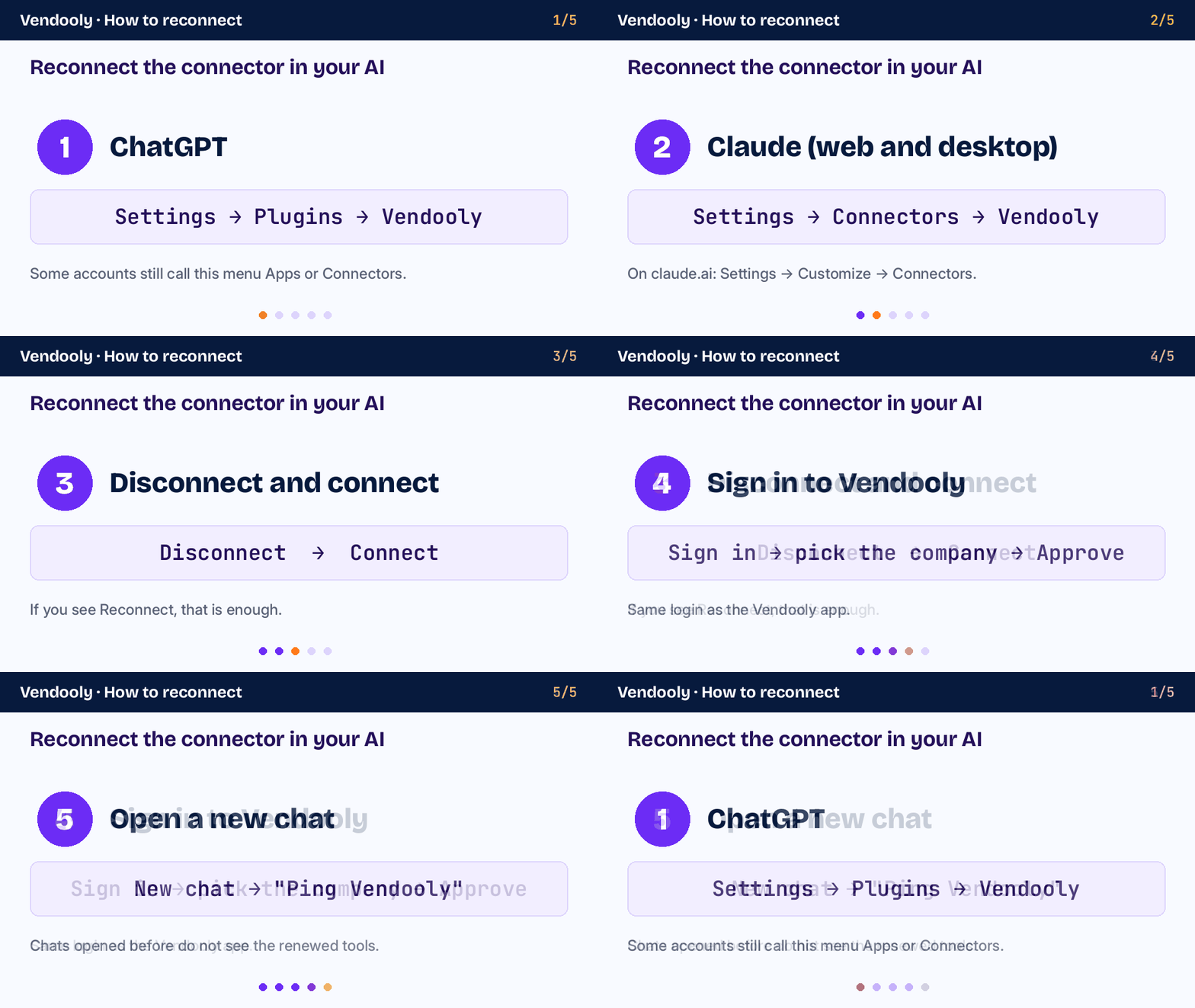
ChatGPT has moved connectors several times: today the menu is called Plugins, in some accounts still Apps or Connectors.
- Open ChatGPT in the browser (chatgpt.com) and go to Settings → Plugins (Integrations section; in some accounts: Apps or Connectors).
- Open Vendooly in the list.
- If you see Reconnect, click it. Otherwise click Disconnect and then Connect.
- Sign in to Vendooly, pick the company and approve.
- If you created the Vendooly app yourself in developer mode and the tools do not update, open the connection and click Refresh.
- Open a new chat: chats opened before do not see the renewed connection.
Reconnect the connector in Claude (claude.ai and Claude Desktop)
Connectors belong to your Claude account: reconnecting on claude.ai also applies to the desktop app, and vice versa.
- On claude.ai open Settings → Customize → Connectors. In the Claude Desktop app: Settings → Connectors.
- Find Vendooly. If it shows Connect, click it; if it looks connected but does not respond, open the … menu, choose Disconnect and then Connect.
- Sign in to Vendooly, pick the company and approve.
- In the chat click + → Connectors and check that Vendooly is on, then open a new chat.
- If the connector is gone, add it again with Add custom connector and the address
https://mcp.vendooly.com/mcp. - Team and Enterprise plans: the organization owner adds the connector; you only click Connect.
Reconnect the Amazon seller account
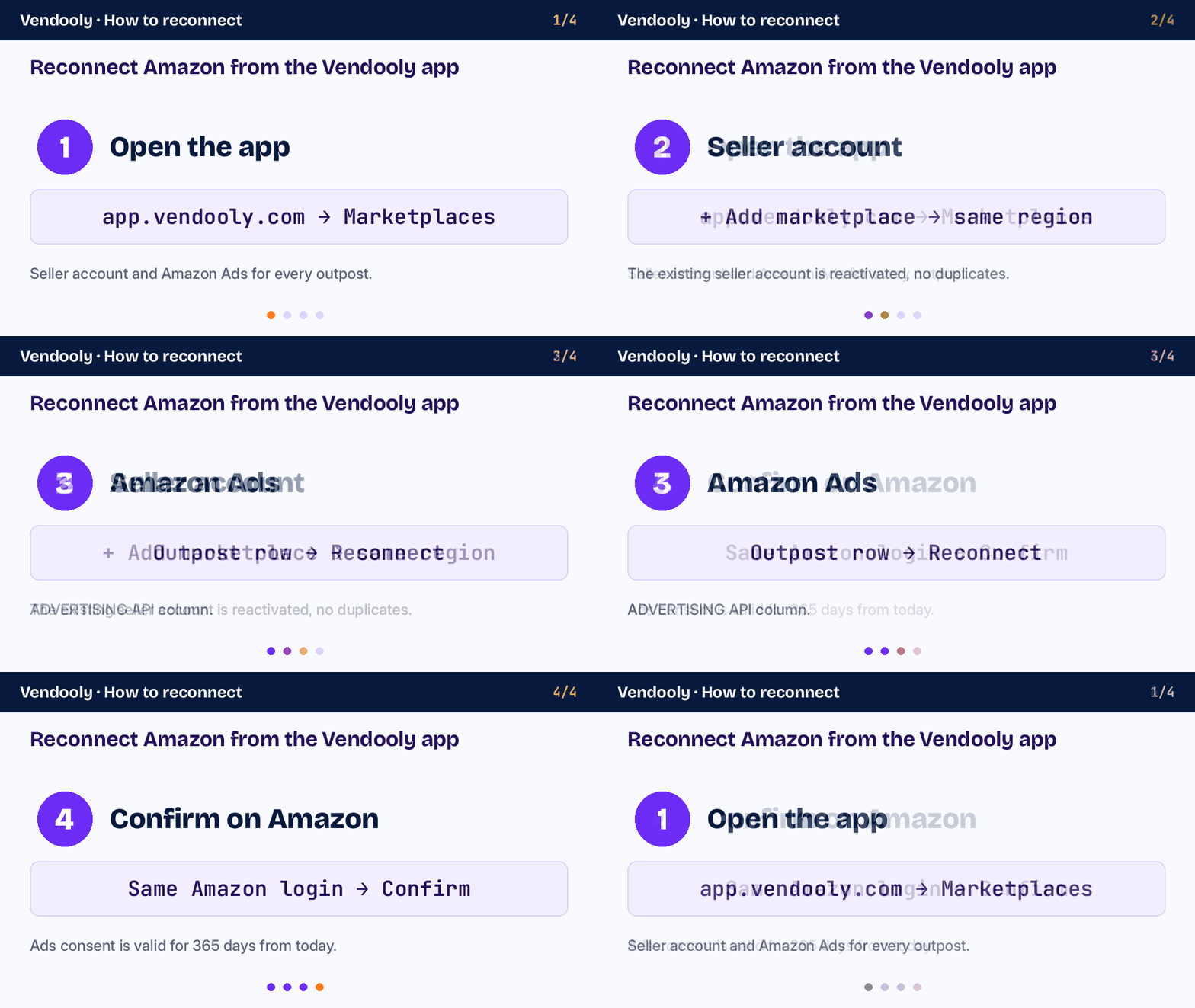
You do it from the Vendooly app by repeating the Amazon authorization: the existing seller account is reactivated, no duplicate is created.
- Open the Vendooly app and go to Marketplaces (https://app.vendooly.com/app/marketplaces.html).
- Click + Add marketplace and pick the same region as the seller account (Europe, North America or Far East).
- On Amazon sign in with the same Seller Central login of that seller account and confirm the authorization.
- Back in Vendooly, the marketplaces reappear and syncing restarts.
Reconnect Amazon Ads
Amazon Ads is a separate authorization from the seller account: renew it even if Seller Central is connected.
- In Marketplaces, on the outpost row, ADVERTISING API column, click Reconnect (or Connect if Ads were never connected).
- On Amazon sign in with the login that has access to the advertising account of that seller account and confirm.
- If Vendooly asks, pick the right Ads profile.
- The new consent is valid for 365 days from today. Vendooly warns you by email 30 and 7 days before it expires, and in Marketplaces.
If reconnecting fails straight away
- If the connection is refused after the Vendooly sign-in, check your subscription: with an ended free trial or an inactive subscription, reconnecting is not enough. Go to https://app.vendooly.com/app/billing.html.
- Make sure you sign in with the right user and that you are still a member of the company in Vendooly.
- If your email is not confirmed yet, the AI can read but not change anything: confirm your email and within an hour changes are available again without reconnecting.
- If it still does not work, write to support@vendooly.com saying which connection (AI, seller account or Ads) and when you tried.
Ready-to-use prompt
Ping Vendooly, then use get_client_status: tell me whether the connector, the seller account and Amazon Ads are connected, and if something needs reconnecting, tell me which one and how.